
Managing huge enterprise datasets requires smart report design. Otherwise, DAX queries run slowly and exhaust server memory. Developers often turn to Aggregations and Composite Models to speed up report performance.
Although both techniques handle large data volumes, they serve different architecture needs.
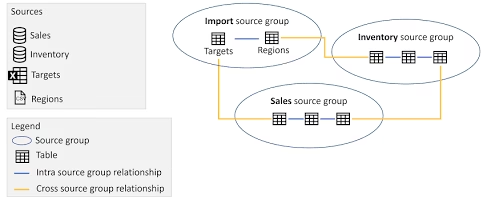
Understanding Power BI Composite Models
A Composite Model lets you combine multiple storage modes within a single report file. For example, you can load small dimension tables using Import mode. At the same time, you can query massive transaction tables using DirectQuery mode.
Consequently, composite models let you mix different data sources seamlessly. You can join live SQL database tables directly with cached Excel files or certified cloud semantic models.
Understanding Power BI User-Defined Aggregations
Aggregations store pre-calculated summary tables inside in-memory RAM alongside a detailed DirectQuery fact table. Therefore, Power BI routes high-level summary queries to the fast, cached aggregation table automatically.
However, when a user drill-downs into row-level transaction details, Power BI automatically redirects the query to the underlying DirectQuery database.
Direct Comparison: Aggregations vs Composite Models
| Architecture Feature | User-Defined Aggregations | Composite Models |
| Primary Goal | Accelerates query response times for big data. | Combines multiple storage modes and data sources. |
| Data Storage | Caches summary values in RAM; leaves details in SQL. | Assigns Import, DirectQuery, or Dual per table. |
| Query Behavior | Power BI selects the best table automatically. | Queries execute based on individual table storage modes. |
| Best Used For | Multi-billion row fact tables needing fast summary views. | Blending live warehouse data with secondary files. |
Fast-Tracking Your Analytics Career
Learning how to optimize query speeds and design scalable data models builds valuable enterprise skills.
If you want to gain practical hands-on experience with advanced big data architectures, enrolling in power bi training hyderabad offers expert mentorship and real-world project training.
Final Thoughts
Both Aggregations and Composite Models help developers handle massive enterprise datasets effectively. Use Aggregations to speed up query execution on huge fact tables. Choose Composite Models when you need to combine distinct data sources and storage modes into one report.